Symmetra LX/RM/XR Frames
At some point, a message similar to the following will appear, this page explains how to identify batteries:
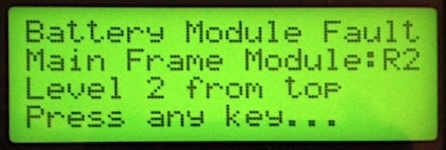
- Two column frames have Left and Right sides
- Three column frames have Left, Center, and Right sides
- Columns have either one, three, or five levels; top down
e.g. R2 would be in the Main Frame, right module, 2nd row.
Symmetra LX:
- Power Module(s): The Symmetra LX supports one to three (8kVA) or five (16kVA) power modules. Each module provides 4 kVA/3.2 KW power.
- Battery Module(s): The Symmetra LX can house up to two (8kVA) or four (16kVA) SYBT5 battery modules.
- Intelligence Module(s): The main intelligence module (MIM - lower half-slot) is the “brain” of the Symmetra LX. It gathers and processes data, including monitoring the condition of each module. A redundant intelligence module (RIM - upper half-slot provides a backup in the event of a MIM failure or while a MIM is being replaced.
LX 16kVA Master Frame
| L1 Power Mod 1 | R1 IM0/1 |
| L2 Power Mod 2 | R2 Batt Mod 1 |
| L3 Power Mod 3 | R3 Batt Mod 2 |
| L4 Power Mod 4 | R4 Batt Mod 3 |
| L5 Power Mod 5 | R5 Batt Mod 4 |
LX 8kVA Master Frame
| L1 Power Mod 1 | R1 IM0/1 |
| L2 Power Mod 2 | R2 Batt Mod 1 |
| L3 Power Mod 3 | R3 Batt Mod 2 |
9-Slot XR Frame
| L1 Batt Mod 1 | C1 Batt Mod 2 | R1 Batt Mod 3 |
| L2 Batt Mod 4 | C2 Batt Mod 5 | R2 Batt Mod 6 |
| L3 Batt Mod 7 | C3 Batt Mod 8 | R3 Batt Mod 9 |
1-Slot XR Frame
| L1 Batt Mod 1 | C1 Batt Mod 2 | R1 Batt Mod 3 |
Symmetra RM:
- Power Module(s): The Symmetra RM supports one to four power modules. Each module provides 2 kVA/1.4 KW power.
- Battery Module(s): The Symmetra RM can house up to six SYBT2 battery modules (three on the right and three in the lower bays on the left).
- Intelligence Module(s): The main intelligence module (MIM - lower half-slot) is the “brain” of the Symmetra RM. It gathers and processes data, including monitoring the condition of each module. A redundant intelligence module (RIM - upper half-slot provides a backup in the event of a MIM failure or while a MIM is being replaced.
RM Master Frame
| L1 Power Mod 1 | R1 IM0/1 |
| L2 Pwr 2/Batt 4 | R2 Batt Mod 1 |
| L3 Pwr 3/Batt 5 | R3 Batt Mod 2 |
| L4 Pwr 4/Batt 6 | R4 Batt Mod 3 |
RM XR Frame
| L1 Batt Mod 1 | R1 Batt Mod 1 |
| L2 Batt Mod 1 | R2 Batt Mod 1 |
Extended Run (XR):
The Main Frame is always designated as Frame #1. When Extended Run (XR) Frames are added, each frame’s number is set using the rotary dial switch on its rear panel communication card. The first Extended Run Frame is factory-set to Frame #2, with subsequent frames set sequentially to #3, #4, etc. Each additional XR frame is connected to the previously installed frame. Up to seven XR frames are supported.
| Problem | Possible Cause | Solution |
|---|---|---|
| Neither the rear green status LED, nor the front display illuminate after connecting the communication cable. | There is no battery power present at the frame. | Check cables and modules are properly installed. |
| The communication cable is not installed. | Check the communication cable is properly installed. | |
| The rear green status LED illuminates, but the front display does not show the frame number. | The front display cable is not connected. | See the Extended Run Cabinet Physical Installation Guide for proper cable connection instruction. |
| There is a potential hardware failure. | Escalate to next support tier. | |
| The front display continuously flashes on and off. | More than one frame is set with the same frame number. | Check XR frame numbers are unique (rear rotary dial). |
| An XR frame failure is reported. The front display flashes an error code. | EO may indicate a missing/bad battery cable. | Check that the battery cable is properly installed. |
| E7 may indicate a missing/bad communication cable. | Check that the communication cable is properly installed. | |
| Any other code could indicate a hardware failure. | Escalate to next tier, and report the error code. | |
| The front display alternately flashes the frame # and either Lx, Cx, or Rx. | A failed battery module has been detected in the location shown. | Replace the battery module with a known good one. |
| The number of reported battery modules is inaccurate. | One or more battery disconnect switches open (LX only). | Check that each battery switch is in the connected position. Use a coin to turn it. |
| Battery module(s) not correctly installed. | Check that all battery modules are properly installed by reseating. |