UCM Status/Restart
Problem:
- ❌ Unable to login to the UCM
- ❌ Unable to login to Call Server
- ❌ Unable to login to MGC's
- ✅ UCM login possible via SSH
Element Manager:
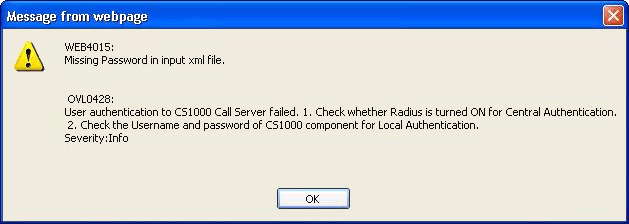
WEB4015:
Missing Password in input xml file.OVL0428:
User authentication to CS1000 Call Server failed. 1. Check whether Radius is turned ON for Central Authentication. 2. Check the Username and password of CS1000 component for Local Authentication.
Solution:
If you're having trouble logging in to a CS1K or Element Manager (Rel 7.5), restarting the Jboss application from the CLI often helps.
1 Login to UCM0/SS0 CLI with admin2.
2 Check the UCM status:
[admin2@ss0 ~]$ appstart Jboss-Quantum status
jbossd (pid 3602 3601) is running...
3 To restart the UCM:
[admin2@ss0 ~]$ appstart Jboss-Quantum restart
                                                           [  OK  ]
                                                           [  OK  ]
Synchronizing the system host database file                [  OK  ]
Stopping jbossd:kill: usage: kill [-s sigspec | -n signum | -sigspec] pid | jobs
pec ... or kill -l [sigspec]
                                                           [  OK  ]
Starting Jboss daemon procss                               [  OK  ]
[admin2@ss0 ~]$
4 As always, wait for the UCM is now ready to use message (~5 mins) before trying to use it:
Message from syslogd@ss0 at Oct  9 11:39:49 ...
    UCM is now ready to use.

[admin2@ss0 ~]$
5 Unfortunately, if this doesn't work, try plan B:
- Unregister the call server from the security domain; goto load 117, enter:
unreg u s - Log out of the call server, but be sure you know the original admin2 password (default: 0000), as this will be required to log back in!
- Login to the call server with admin2; goto load 117 and enter:
reg u s - IF an MGC fails to register, Telnet into it with admin2, and:
joinSecDomain
6 If plan B doesn’t work, try the nuclear option:
- Unregister the call server from the security domain; goto load 117, enter:
unreg u s - INI the call server; load 135, enter:
ini both(orini activefor single core) - Reboot SS0 and SS1: SSH in with admin2, enter:
reboot - When everything is back up, login to the call server with admin2; goto load 117 and enter:
reg u cs - Telnet into each MGC, login with admin2, and:
joinSecDomain - Login to Element Manager (as admin), and resync the node: Nodes: Servers Media Cards → IP Telephony Nodes → Start Sync
Also see Check Registered Elements. This process will incur some service interruption.