MIRAN File Transfer
There are several ways to transfer files to or from a MIRAN card:
| Method | Requirements | Service |
|---|---|---|
| 1. Via PCMCIA slot (drive A:) | A 64Mb PCMCIA CF memory card/adapter |  |
| 2. Via File Transfer Protocol | LAN connection, IP address, FTP client | |
| 3. Mount the CF on PC/laptop | Remove onboard flash drive, USB CF reader |  |
If the MIRAN card is connected to a LAN (ELAN), network file transfer (FTP) is a good non-service impacting option! This method can be used to make backup copies of the keycode, music/announcement, and calendar files. A network connection also allows remote administration via a web browser, and/or TELNET.
A NTVQ0120E5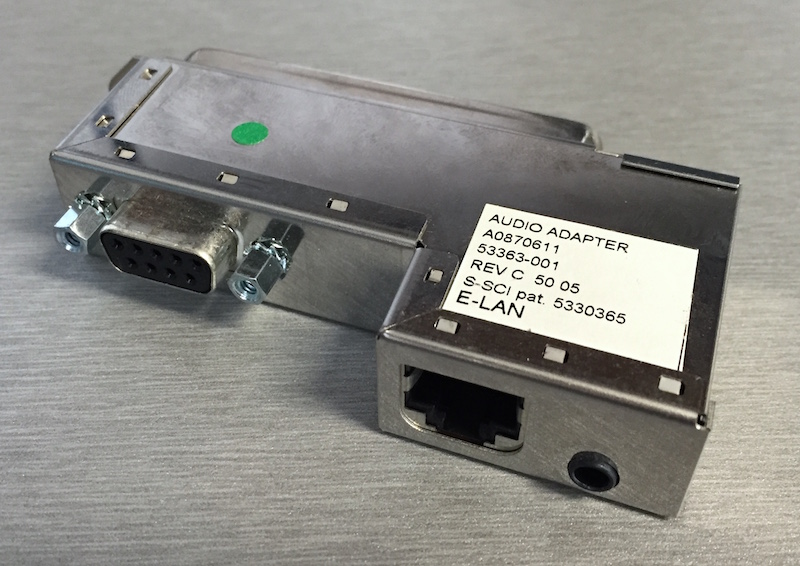 50 pin i/o adapter is required to connect MIRAN to a network.
To assign MIRAN an IP address:
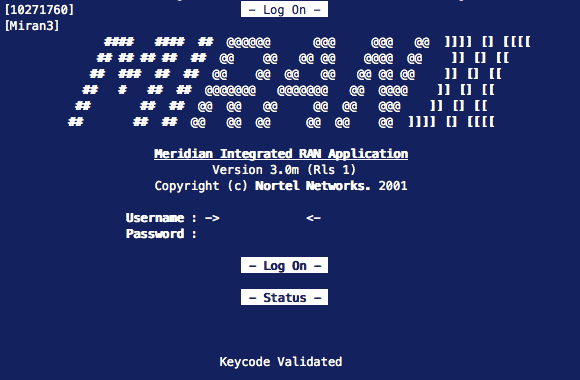
- Log on from a serial TTY (9600-8n1). Shift-tilde (~) refreshes the screen.
- Select "2", Pack Administration, then "6", Ethernet Configuration.
- Enter an IP address, subnet, and gateway, for "IP Method", enter "static".
- Arrow down to "Set" and hit enter to save changes. Exit and log out.
- Reset the card (front panel button) for the changes to take effect.
FTP Commands:
MIRAN has a limited FTP command set, the following commands are supported:
| Cmd | Description |
|---|---|
| cd | Change MIRAN drive |
| lpwd | Print local directory path |
| lcd | Change local directory |
| asc | Set ASCII mode |
| bin | Set binary mode |
| Cmd | Description |
|---|---|
| ls | List files on MIRAN drive |
| get | Copy file from MIRAN |
| put | Send file to MIRAN |
| del | Delete file on MIRAN drive |
| bye | Close session |
! (exclamation) is a local shell, prefix a command to execute it locally, eg: !ls
Use ASCII mode to transfer text files (keycode.dat), and Binary mode to transfer all other files.
Change to the MIRAN PCMCIA drive with cd /A:, or internal flash drive (default) with cd /C: - drive letter is uppercase.
The plain-text file C:KEYCODE.DAT must be present (and validate) for MIRAN to function after a reboot.
To restore the default accounts (and reset passwords), delete the file C:_USERS.DAT (mount CF if no access).
Default accounts: User: user/user0000 | Administrator: admin/admin000 | Distributor: distrib/distrib0
Example:
MIRAN does not support PWD causing some GUI programs to fail, therefore, simply use the command line.
Open a FTP session from the command line (Windows) or Terminal (Mac) with ftp <user>@<IP-address>
Windows may try to resolve <user>@<IP-address>, in which case, type ftp, and then open <IP-address>
You are then prompted (from the Miran) for a username and password.
Transfer files with put <filename> or get <filename>, being careful to set the correct mode first (eg, bin).
Close the session with close, bye, or quit.
Transferring a .wav file to the Miran:
$ ftp admin@192.168.32.32                     ⇐ open connection
Connected to 192.168.32.32.
220 VxWorks (5.4) FTP server ready
331 Password required
Password: ########                            ⇐ default: admin/admin000
230 User logged in
ftp> bin                                      ⇐ set binary mode
200 Type set to I, binary mode
ftp> put flowy.wav                            ⇐ copy file to MIRAN
local: flowy.wav remote: flowy.wav
227 Entering Passive Mode (192,168,32,32,4,26)
150 Opening BINARY mode data connection
100% |***********************************|  1557 KiB  345.83 KiB/s    00:00 ETA
226 Transfer complete
1594997 bytes sent in 00:04 (317.28 KiB/s)
ftp> bye                                      ⇐ close the session
221 Bye...see you later