NT8D01 Controller faceplate codes
The NT8D01 Controller faceplate has a two digit hexadecimal display with two modes: normal operation and power-on-reset/self-test.
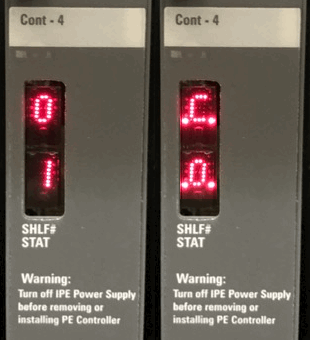
Normal operation:
During normal operation the display alternately shows:
- SHLF#: The Controller number (1-95) in hexadecimal
- STAT: The Controller tracking mode, eg: the port the controller clock is tracking (with dots)
The possible tracking modes are:
- C0 - Controller is tracking to the network connected to port 0.
- C 1 - Controller is tracking to the network connected to port 1.
- C2 - Controller is tracking to the network connected to port 2.
- C3 - Controller is tracking to the network connected to port 3.
- CF - Controller is not tracking any network, or not connected.
eg, Controller #1, with a superloop connected to port 0: display alternates 0 1 and C0.
Superloop (SUPL) and controller (XPE) assignments are printed and programmed in LD 97 (admin),
or printed and STATed in LD 32 (maintenance). Also see: Controllers and Segments.
Maintenance:
If you suspect a bad loop, but the NT8D04 (superloop) is OK, try moving the CONT-4 back plane connector to one of the other ports. They are marked SL0, SL1, SL2 and SL3 - only possible with 1 Superloop/IPE. Re-enable the Superloop and XPEC (LD 32), and test.
Remember, controller cards are not hot swappable: always disable the superloop, and power off the IPE shelf before removing one.
See LD 32 for the following commands:
| Command | Description |
|---|---|
| STAT sl | Get status of specified superloop |
| DISL sl | Disable specified superloop |
| DSXP x | Disable Controller x and all associated IPE cards |
| ENLL sl | Enable specified Superloop |
| ENXP x | Enable Controller x and associated IPE cards |
| XNTT sl | Do self-test of Network card for specified superloop |
| XPCT x | Do self-test on Controller x |
| XPEC (x) | Print data for one or all Controllers |
| SUPL (sl) | Print data for one or all superloops |
Also see LD 30 for the following commands:
| Command | Description |
|---|---|
| CPED l s | Clear Peripheral Controller maintenance displays |
| RPED l s | Read Peripheral Controller maintenance displays |
The 16 most recent displayed codes, stay in memory and can be reviewed using LD 30: RPED l s
Self-test codes:
During the self-tests, the display quickly shows the self-tests listed below. If a test fails, the display shows the number of the failed test for 0.5 seconds before continuing the remaining tests. The self-test sequence is repeated until all tests pass, so a faulty card will cycle.
| # | Definition |
|---|---|
| 02 | A31 #1 external buffer test. |
| 03 | A31 #1 internal context memory test, phase A. |
| 04 | A31 #1 internal context memory test, phase B. |
| 05 | A31 #1 internal TXVM memory test. |
| 06 | A31 #1 configuration memory test. |
| 07 | A31 #1 external FIFO test. |
| 08 | A31 #2 external buffer test. |
| 09 | A31 #2 internal context memory test, phase A. |
| 0A | A31 #2 internal context memory test, phase B. |
| 0B | A31 #2 internal TXVM memory test. |
| 0C | A31 #2 configuration memory test. |
| 0D | A31 #2 external FIFO test. |
| 0E | peripheral side W72 loopback test using A31 #1. |
| 0F | peripheral side W72 loopback test using A31 #2. |
| 10 | R72 #1 N-P switching control memory test. |
| 1 1 | R72 #1 320 x 8 NIVD buffer test. |
| 12 | R72 #1 N-P quiet-code register test. |
| 13 | R72 #1 P-N switching control memory test. |
| 14 | R72 #1 640 x 8 XIVD buffer test. |
| 15 | R72 #1 640 x 8 XIVD loopback buffer test. |
| 16 | R72 #1 P-N quiet-code register test. |
| 17 | R71 #1 register test. |
| 18 | R71 #1 continuity test, peripheral side. |
| 19 | R71 #1 continuity test, network side. |
| 1A | R71 #1 simulation packet transmission test. |
| 1B | DUART port A self-test. |
| 1C | DUART port B self-test. |
| 1D | R72 #2 N-P switching control memory test. |
| 1E | R72 #2 320 x 8 NIVD buffer test. |
| 1F | R72 #2 N-P quiet-code register test. |
| 20 | R72 #2 P-N switching control memory test. |
| 2 1 | R72 #2 640 x 8 XIVD buffer test. |
| 22 | R72 #2 640 x 8 XIVD loopback buffer test. |
| 23 | R72 #2 P-N quiet-code register test. |
| 24 | R71 #2 register test. |
| 25 | R71 #2 continuity test, peripheral side. |
| 26 | R71 #2 continuity test, network side. |
| 27 | R71 #2 simulation packet transmission test. |
| EE | Bus error, exception errors, etc. |